Want to save time and energy during your wedding planning process? Create your custom wedding website on theknot.com.
No need to research competitors’ sites to compare features. (Spoiler alert: they’re all the same.)
Your wedding website will:
- Give guests all the details they need to know (and prevent you from having to respond to a flurry of text messages the day before your wedding).
- Manage your RSVPs.
- Link to your registries, and track which gifts your guests purchase.
- Tell your love story (if you want it to), and display photos of you and your fiancé.
- Introduce your wedding party (again, if you want it to).
- Take the guesswork out of stationary!
In today’s post, I’ll talk about when to create your wedding website, what information to include, and why I recommend picking a theme with a matching stationary suite.
When to create your wedding website
With The Knot, you can hide and publish pages, which means you can create your website anytime during the planning process. Hooray!
While you can create your website anytime, I’d recommend waiting to share your site until you’ve made decisions about your date, location, and timeline. Otherwise, people are going to have questions, and you’re going to have a headache. Everything else can be “TBD,” as long as it’s ready by the time you send your invitations!
Keep in mind, though, tech-savvy friends can find your wedding website by searching theknot.com, so if you’ve not yet finalized your wedding party, or if you’re playing around with registries, it’s best to keep that information hidden until it’s ready.
We included a link to our wedding website on our save-the-dates, which we mailed 8 months in advance of our wedding. And at that time, we had our date, ceremony time, ceremony and reception location, engagement photos, and wedding party selected. We’d also decided on the “vibe” we wanted our wedding to have (largely influenced by our personalities, but also by our venue), so we incorporated a short Q&A section that included information about attire.
If your guests will be traveling from out of town, it’s also important to offer information about the closest airport, as well as hotels near your venue (or your hotel block, if you opt to reserve one), as soon as possible.
By the time we mailed our invitations, we’d added our gift registries, an RSVP page, and recommendations for places to eat and things to do in town.
What to include on your wedding website
First, create a short and easy-to-remember URL, like you and your partners’ first or last names. Our URL was theknot.com/madisontiffany.
Your wedding website should, at minimum, include details about your wedding day and accommodations, such as:
- Date
- Location (city, state)
- Venue name(s) and address(es)
- Timeline
- Ceremony time, and suggested arrival time 15 minutes beforehand (you don’t want anyone walking in while you or your partner is walking down the aisle)
- Cocktail hour time
- Reception time
- Sendoff time
- Flight and hotel accommodations
- Name the closest airport(s).
- If you’re not reserving a hotel block, list a handful of hotels or rentals in the area to make it easy for your guests to book a room.
Other information that’s helpful, but optional, to include:
- A Q&A addressing questions about:
- Attire
- Parking
- Food (people with allergies will be particularly interested in whether or not there will be options available for them)
- Kids
- RSVPing
- Gifts
- Things to do in the area
- Gift registries
- RSVPs
I recommend including all of the above.
The Q&A will prevent you from having to answer all the questions leading up to your wedding. And it can set expectations, too. You can view our Q&A for an example.
Recommending things to do will keep your guests busy during their stay, and therefore out of your hair 🙂
You may not think a gift registry is necessary, especially if you’ve lived with your partner for years, but trust me, it is. People will buy you gifts whether or not you have a registry, so you might as well give them a list of things you’d actually want. We created both honeymoon and traditional registries using Amazon and Traveler’s Joy.
Managing your RSVPs online just makes your life easier! You don’t have to include an RSVP card and self-addressed, stamped envelope in your stationary suite, so it saves you money. And you can have certain guests RSVP for certain events. For example, you may want your wedding party to RSVP to your rehearsal dinner as well as to your reception. If your family is hosting a post-wedding brunch, you may want to have their guests RSVP to that as well.
We also asked our guests to let us know when they planned to arrive and where they were staying. Initially, I thought I’d create welcome baskets for hotel rooms, but that proved to be a little too complicated. Knowing when people planned to arrive was helpful, though, because it allowed us to plan for airport pick-ups.
You can view our wedding website as an example.
Pick a theme with matching stationary
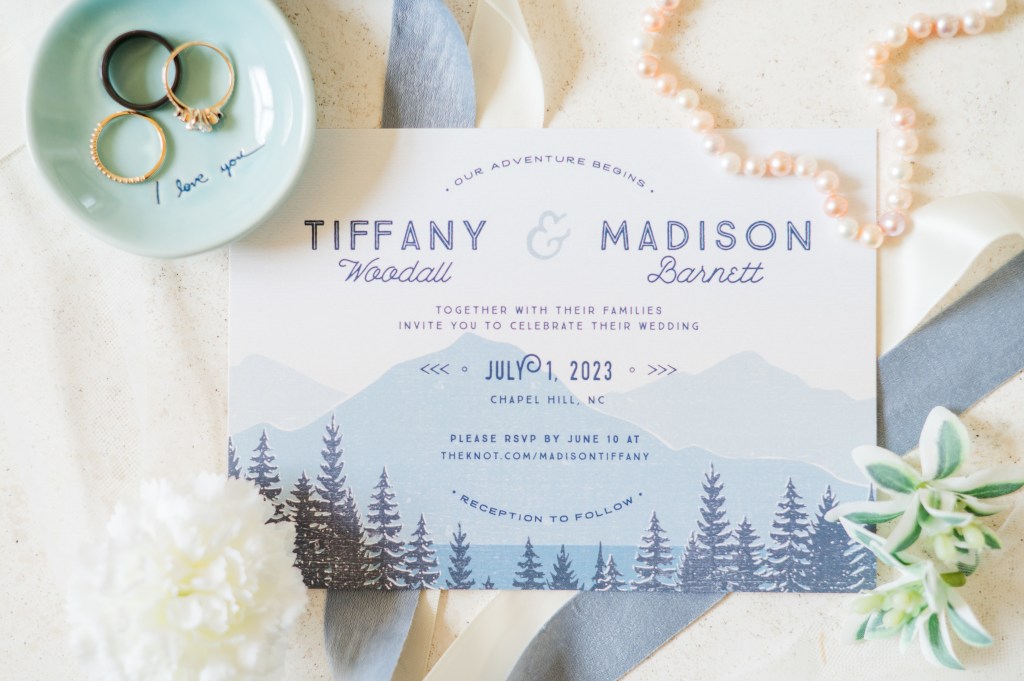
There are SO MANY OPTIONS when it comes to save-the-dates and invitations. Keep things simple and select a wedding website theme that has a matching stationary suite.
Then, your save-the-dates, invitations, and any other paper items (like ceremony programs, cocktail menus, and thank-you cards) will adhere to one theme without you having to scour the internet for designs that complement one another.
We chose the Vintage Mountain Blue theme because our wedding colors were shades of blue, and we met in the mountains.
A good wedding website will make wedding planning easier and less complicated.
Was this post helpful? I’d love your feedback! Please consider leaving a comment and sharing your own wedding plans 🙂
Happy planning!




 Mama's Lullablog
Leave a reply to Wedding invitations: what you do and don’t need – Tiffany Barnett Cancel reply